Monitor arms, and the two numbers on your screen that decide everything
The short answer
Prices in GBPUSDEUReach row carries the day it was read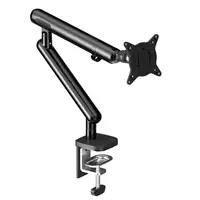

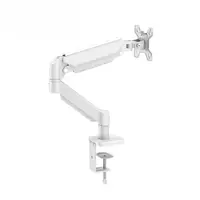
A monitor arm does one thing a stand cannot: it gets the screen off the desk and puts it where your eyes are, at the height you sit, without a stack of books. At the price of a takeaway, it is one of the better things you can do for your neck.
The listings, though, are sold on the wrong number. Most titles here lead with a screen size, and the screen size is the least useful thing about whether the arm will work for you.
Look at the back of your monitor first
Turn the monitor round. On the back, usually in the middle, are four threaded holes in a square, either 75mm or 100mm apart. That square is the VESA mount, and it is what every arm on this page bolts to.
Most monitors have it. Some do not, particularly thin designs from big brands where the stand clips on with a proprietary fitting. If yours has no holes, an arm will not attach, whatever the listing says about your screen size. Model-specific adapter plates exist for many of those monitors, and a search for your monitor’s model number plus “VESA adapter” will find one, but it is a second purchase and a second thing to get right.
Six of the fourteen titles here say VESA, and two of those spell out 75 and 100, meaning the plate carries both hole patterns. Where the title is silent, the plate is in the listing’s photographs, and it is worth finding it before paying rather than after.
Then find the weight
The second number is the weight of your monitor without its stand. It is on the manufacturer’s specification page, and it is often surprising. A 27 inch office panel can be four kilograms. A 27 inch gaming monitor with a big heatsink can be seven. A 32 inch curved screen can be over ten.
Now read the arm’s title for its load range. It appears as 10kg, or 2-9kg, or 2-10kg, and once here as 22 lbs, which is ten kilograms. That number is the whole decision. Inside the range, the gas spring holds the screen where you leave it. Over the range, the screen drifts downward, and the arm’s tension screw will not fix it for long. Under the range, and this is the one people miss, the spring pushes the screen up and will not let it sit low.
Five of the fourteen titles here state a weight at all, and four of those state a range with a minimum: three NB models and the SC5. The other nine give nothing. If a listing gives no weight, the size range is all you have, and the size range is a guess.
Size is not weight
One title here covers screens up to 38 inches, and states 10kg. Another covers up to 49 inches and states no weight at all. A 49 inch ultrawide is not a big version of a 27 inch monitor; it is a different object that can weigh three times as much.
Read the inch range as “the plate will physically fit” and nothing more. The weight range is the specification. If it is not stated, the arm was not rated for a screen that heavy, whatever the inch number says.
Single, dual, or four
Most people want one arm for one screen. A dual arm holds two screens on one clamp, which is neater than two clamps and costs less, but the two arms share one desk edge and one set of springs, and each side has its own weight limit. A quad arm, and there is one here, is a wall of four small screens for a trading desk or a dashboard, not a home office.
The choice is decided by how many screens you have today, not how many you might have. A second single arm later is cheaper than a dual arm now.
The clamp, and the desk under it
Every arm here attaches with a clamp over the back edge of the desk. That clamp needs three things: a free edge, a desk top thick enough to grip, and a desk that does not flex. A hollow flat-pack desk with a thin top, or a desk with a rounded or raised back edge, may not take a clamp at all.
The alternative is a grommet mount, a bolt through a hole in the desk. Five of these titles say they include one alongside the clamp. If the desk edge is the problem, look for that word, or for the fitting in the photographs.
The lever matters too. A seven kilogram screen at the end of an extended arm puts a large twisting load on that clamp. Heavier screens want a thicker desk, not just a stronger arm.
What the titles leave out
None of these state the arm’s reach, the distance it can bring the screen forward from the clamp. That is what decides whether the screen can come to you when you lean back, or only swing left and right. The photographs usually show it, and it is worth reading the dimensions in the listing rather than the title.
Full motion means the screen tilts, swivels and rotates to portrait. Five of these say it. What varies is how smoothly, and a listing cannot tell you that.
What I would actually do
Weigh the monitor first, from its specification page. Then buy the single arm whose title states a load and a plate size, because it has told you the two things you need and the others have not.
If you want a brand with a manual and spare parts, the NB F80 states both a minimum and a maximum, and that minimum is the number that catches out people with a small light screen.
If you have two screens, the dual arm, and check the weight of each screen separately against the per-arm limit.
If your monitor has no VESA holes, stop, find the adapter plate for your exact model, and then come back.
Side by side
Prices in GBPUSDEUR. Each row carries the date its price was read.
| Product | Price | Why it is here | Where to buyLink |
|---|---|---|---|
| Best overall 17-38“ 10kg single arm air press gas spring vesa | £41.98$54.12€49.42checked 18 Oct 2026 | States its load, 10kg, and its plate, VESA 100x100, which are the two numbers you need to check against your monitor | Check opens in a new tab |
| If you want the known brand NEW NB F80 2-9kg Popular 17"30" Monitor Screen | £10.14$13.07€11.93checked 18 Oct 2026 | NB F80, a brand with model numbers and spares, and it states a minimum as well as a maximum, 2 to 9kg | Check opens in a new tab |
| If you have two screens Dual Monitor Stand Gas Spring Adjustable Mount | £16.67$21.59€19.62checked 18 Oct 2026 | A dual gas spring arm, height adjustable, on one clamp | Check opens in a new tab |
Check the back of the monitor before the listing
- VESA 75 or 100 means four threaded holes on the back of the screen, 75mm or 100mm apart. Six titles here say VESA and two spell out both sizes; for the rest, the plate is in the photographs. A monitor without the holes needs a model-specific adapter plate first, and those exist, but they are a separate purchase.
- The weight range in a title, written as 2-9kg or 10kg, is the specification that matters. Your monitor's weight without its stand is on the manufacturer's page. Stay inside the range.
- Gas spring is what lets you move the screen with one hand and have it stay put. Thirteen of the fourteen titles here say it. The cheaper alternative, a fixed post with a knob, is a stand rather than an arm.
- One known brand, NB, appears under several model numbers here. That is worth a little more for one reason: spare parts and a manual you can find.
What the inch number does not tell you
- 17 to 32 inch is a size, not a weight. Two 27 inch monitors can differ by two kilograms. An arm rated for a screen's size can still sag under it if the weight is over the range.
- The minimum weight matters as much as the maximum. A gas spring rated 2 to 9kg will push a very light screen upwards and refuse to hold it low. A small 22 inch panel can be under two kilograms.
- The clamp needs a desk edge. A thin, hollow or rounded-edge desk may not take a clamp at all, and a heavy screen on a long arm is a lever on that clamp. The alternative is a grommet fitting through a hole in the desk, which few listings mention.
- None of these state the arm's reach in centimetres, which decides whether the screen can come to you or only swing sideways.