Stylus pens, and the difference between a pen that works on any screen and one that works on an iPad
The short answer
Prices in GBPUSDEUReach row carries the day it was read

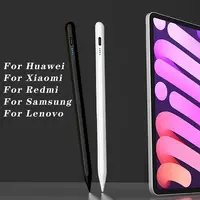

A stylus is the cheapest way to make a tablet a notebook, and the shelf is confusing in exactly one way: two completely different objects are sold under the same word. Twenty of them are here, and the titles do let you tell them apart, once you know which words to look for.
Passive or active
A passive pen, which the titles call universal, 2-in-1 or capacitive, is a fingertip in a tube. The screen sees it the way it sees your finger. It works on every touchscreen ever made, it never needs charging, and it cannot do the one thing that makes writing on glass bearable: it cannot tell your hand from the pen. Rest your palm on the screen and the pen stops.
Eleven of these twenty are passive. Six of them are 2-in-1, meaning a rubber nub at one end and a clear plastic disc tip at the other. The disc is the better end for anything precise, because you can see through it to where the point lands.
An active pen has a battery and a fine hard tip, and talks to the tablet’s own stylus support. On an iPad that gives you palm rejection, which four titles here say, and sometimes tilt, which one says. Seven of the twenty are active, and every one of them is sold for an iPad, because that is the only tablet these work on.
What Apple Pencil means on this page
Nine titles say Apple Pencil, iPad Pencil or for Apple Pencil. Read those as a search term. Two of the nine are replacement nibs for the real thing, which is an honest use of the name. The other seven are active pens that are not an Apple Pencil and do not claim to be, once you read past the first four words.
The difference is pressure. An Apple Pencil, and the pens Apple licenses, draw a thicker line when you press harder. The active pens here have palm rejection and, on one, tilt, and no pressure sensitivity, because the way they talk to the iPad does not carry it. For handwriting that does not matter. For drawing it is the whole difference, and no title here pretends otherwise, which is more than the first four words suggested.
Android is a different question
Ten titles list Android, Samsung, Xiaomi or Huawei beside iPad. Every one of them is a passive pen. That is not a coincidence. The active pens here work through the iPad’s stylus support, and on an Android tablet they are a hard plastic stick that does nothing.
If you have an Android tablet and want palm rejection, the answer is the tablet maker’s own pen, an S Pen or a Xiaomi Smart Pen, which is not on this page. If you want a pen for tapping and sketching without charging anything, the universal ones work, and one of them is magnetic so it stays put on the tablet’s edge.
The generation list
Eight titles are a list of iPad generations: 7th, 8th, 9th, 10th, 11th, Air 4, 5, Pro 11, 12.9, 13, mini 5, 6, 7. An active pen needs an iPad that supports a stylus at all, which means one from 2018 onward, and the list is the seller telling you which ones they have tried.
Do not match it to the year you bought the iPad. Turn the iPad over, read the model number, look it up, and match the generation. It takes two minutes and it is the difference between a pen and a return.
What none of the active pens says
How it charges. Seven pens with a cell inside and not one title says USB-C, micro-USB or a battery life. One says wireless charging, which on an iPad means it charges from the iPad’s edge the way the real Pencil does, and only on the iPads that do that. The cheap phone extras guide covers why the cable question matters more than it sounds.
How long it lasts. No title states hours. The usual figure is somewhere between ten and twenty, and a pen that sleeps when you put it down lasts a week of notes.
How fine the tip is. One title says fine tip. The rest do not say, and on an active pen the tip is a consumable that wears to a shape after a few months on glass. Two titles here sell spare nibs for the real Pencil; none sells them for the pens on this page.
What I would actually do
For an iPad, the active pen that says both palm rejection and tilt. It is the only title here with both words, and together they are everything a pen without pressure can offer. Check its generation list against the number on the back of the iPad first.
For any screen, or a phone, the 2-in-1 with a disc tip. It is a passive pen and it knows it, and the disc is the end that makes it worth having.
For an Android tablet, the universal magnetic one. Passive, so it works, and magnetic, so it is still there when you need it.
And if you own the real Apple Pencil, the DIXSG nibs, because the tip wears and the official spares are priced as if they did not.
Whichever you choose, the word to look for is palm rejection, and the word to look past is Apple.
Side by side
Prices in GBPUSDEUR. Each row carries the date its price was read.
| Product | Price | Why it is here | Where to buyLink |
|---|---|---|---|
| Best for an iPad 2026 For iPad Pencil M4 Stylus Pen for Air 6 M2 Pro | £5.18$6.91€6.10checked 18 Oct 2026 | The only title that says both palm rejection and tilt, on an active pen sold for the current iPad Pro, Air and mini | Check opens in a new tab |
| For any screen 2-in-1 Stylus Pen High Sensitivity Disc Tip Rubber | £5.10$6.80€6.00checked 18 Oct 2026 | A universal pen with both tips, a disc for precision and a rubber nub for tapping, which is as good as a passive pen gets and works on everything you own | Check opens in a new tab |
| For an Android tablet Touch Screen Pen Stylus Pencil With Magnetic | £4.96$6.61€5.84checked 18 Oct 2026 | Universal, sold for Huawei, Xiaomi and Samsung as well as iPad, and magnetic, so it stays on the tablet's edge instead of in the bag's bottom | Check opens in a new tab |
What a title here can settle
- Universal or active. Eleven titles say universal, 2-in-1, capacitive or list Android beside iPad: those are passive pens, a fingertip in a tube, and they work on every screen made. Seven are active pens built for an iPad, and four of those say palm rejection, which is the feature that makes a pen worth holding.
- Palm rejection, on four titles, means the iPad ignores your hand resting on the glass while the pen writes. Without it you write with your wrist in the air. It only exists on active pens, and it only works on an iPad.
- Tilt, on one title, means the line gets wider as the pen leans, the way a pencil shades. If you draw, it is the second feature to look for. If you write notes, it is not.
- A disc tip, on two of the universal pens, is a clear plastic disc on a pivot so you can see where the point lands. It is the best a passive pen can do for precision, and it is the one to choose over a rubber nub for anything finer than tapping.
What to read twice
- Nine titles say Apple Pencil, and none of these is one. They say for Apple Pencil, or iPad Pencil, which is a search term riding on a name. An Apple Pencil has pressure sensitivity and pairs to the iPad; none of the active pens here claims pressure, because none has it. Buy them as what they are, a palm-rejecting pen without pressure.
- An active pen does nothing on an Android tablet. The seven iPad pens work by talking to the iPad's own stylus support. On a Samsung or a Xiaomi they are a plastic stick. For Android you want a universal pen, or the tablet maker's own.
- Not one active pen says how it charges. Seven pens with a battery inside, and no title states USB-C, micro-USB or a battery life in hours. One says wireless charging. Ask, because a pen that needs a cable you do not own is a pen that is flat.
- Eight titles are a list of iPad generations, and one of them will be yours or not. The active pens need an iPad from 2018 or later. Check the model number on the back of the iPad against the list before you order, not the year you bought it.