Wireless keyboard and mouse combos, and the two things to check first
The short answer
Prices in GBPUSDEUReach row carries the day it was read
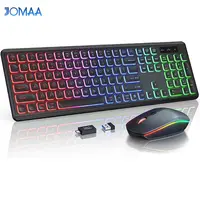
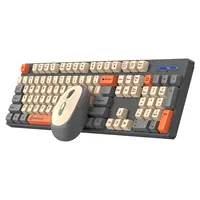
A keyboard and mouse sold together is the cheapest way to fill a desk, and the listings all say the same four things: wireless, ergonomic, full size, RGB. None of those four is the thing that decides whether you are still happy with it in six months.
Two things decide that. How it connects, and which country’s keyboard layout is printed on the keys. The second one is barely ever in the title, and it is the one that comes back to annoy a UK buyer every single day.
What actually matters in a combo
How it connects. Almost everything on this shelf is 2.4GHz: a small USB receiver that lives in a port and talks to both halves. That is the right choice for a desktop. It works before the operating system has loaded, which matters if you ever need to get into a BIOS screen, and it does not drop out the way cheap Bluetooth sometimes does.
The cost is the receiver itself. It is paired at the factory, it is usually not sold separately, and a set whose dongle has gone missing is a set of two things that do nothing.
The layout. More on this below, because it deserves its own section.
What powers it. Either a built-in cell you charge, or ordinary batteries. Neither is better in the abstract, and the listing usually tells you which by naming a charging port or not naming one.
Whether the mouse was an afterthought. In a combo it usually was. That is not a scandal, it is the economics of selling two things for the price of one, but it is worth knowing before you judge the set on the keyboard alone.
The layout problem, and how to spot it in a photo
This is the one that catches people out.
A UK keyboard and a US keyboard have the same keys in different shapes. On a UK board the Enter key is tall and L-shaped, the left Shift is short, and there is a pound sign on the 3. On a US board the Enter is a wide flat rectangle, the left Shift is long, and there is no pound sign anywhere.
Setting Windows or macOS to a UK layout changes what the keys produce, so you can get a pound sign out of a US board. It does not change what is printed on them, so the quote marks and the at symbol are now in the wrong places forever.
The photograph is the only place this shows. Zoom in on the Enter key, then look at the 3. That takes ten seconds and no listing title will do it for you.
Backlighting, and what it costs
Two different things get called backlit here.
Edge glow puts light around or under the keys. It looks good in the product photo and it does very little for finding a key in the dark, because the letters themselves stay unlit.
Lit legends put the light through the letters. That is the version worth paying attention to if the reason you want a backlight is typing at night.
Either way, the light is the biggest single drain on the battery. A set that mentions a sleep mode is telling you it turns the light off on its own, and that is a more useful sentence than a colour count.
Batteries: charged or replaced
A rechargeable keyboard is convenient right up to the point where the cell stops holding a charge, which on a keyboard you might keep for five years is a real consideration. Very few listings at this end of the shelf say anything about whether the cell can be replaced, and silence is not a promise.
A keyboard on ordinary cells runs for months and the fix, when it stops, costs almost nothing. It is less tidy and it lasts longer.
If you are choosing between them, ask how often you want to think about it. A charging port is one more cable on the desk. A battery drawer is one more thing to keep stocked.
The mouse half
Ignore the DPI number. Every mouse on this shelf quotes one, none of them is lying exactly, and the figure has almost no bearing on how a mouse feels.
The things that do matter are size and weight, and neither is usually stated in a way you can act on. Look at the photo with a hand in it if there is one, and check the button count: a plain three-button mouse and a five-button mouse are different products for the same money.
If you already own a mouse you like, a combo is a slightly odd purchase. You are buying a keyboard and getting a spare mouse. That is fine, as long as you know that is what you are doing.
What to avoid
Anything sold entirely on its lighting. RGB is the cheapest feature to add and the first thing to stop mattering. If the title is mostly about colours, the seller has told you where the money went.
A listing with no clear photograph of the whole keyboard. No layout, no legends, no idea. There is enough choice here that you do not need to guess.
“Mechanical feel”. That phrase means the keyboard is not mechanical. A real mechanical keyboard names its switches.
A second receiver. A few sets ship one dongle for the keyboard and another for the mouse, which uses two ports and doubles the thing you can lose. The photo of the box usually shows how many there are.
Delivery to the UK
Two to three weeks is normal from the sellers worth using on this shelf. A keyboard is bulky and light, so it arrives in a box rather than a bag, and boxes travel better.
Nothing here needs a plug adapter, because everything charges or connects over USB. If a set does include a mains charger, that is the one part you should put in a drawer and never use.
What I would actually do
- Desktop, one free USB port: a 2.4GHz set, and check the Enter key in the photograph before ordering.
- You type at night: lit legends and a stated sleep mode, in that order.
- You already have a mouse you like: buy a keyboard on its own, or accept that the mouse in the box is a spare.
- Buying for someone else’s desk: the plain option. Nobody has ever been annoyed by a keyboard for having too few colours.
This is a buying guide built from what the listings publish and from prices I read and date myself. I have not used any of the sets listed. When I buy and use one, this page becomes a hands-on review with my own photographs and it will say so at the top.
Side by side
Prices in GBPUSDEUR. Each row carries the date its price was read.
| Product | Price | Why it is here | Where to buyLink |
|---|---|---|---|
| Best overall JOMAA 2.4G Wireless Keyboard Mouse Combo RGB Backlit | £30.55$40.75€35.95checked 18 Oct 2026 | Full size, and the only one here that names its charging port, Type-C | Check opens in a new tab |
| Best for a dark room Wireless Keyboard and Mouse Combo RGB Backlit | £31.07$41.44€36.57checked 18 Oct 2026 | Lit letters rather than edge glow, and a stated sleep mode | Check opens in a new tab |
| The plain one Shipadoo Wireless Keyboard and Mouse Combo | £22.05$28.77€25.94checked 18 Oct 2026 | Named as a plain wireless set, with no backlight in the title | Check opens in a new tab |
A combo is a sensible buy if the listing answers two questions
- One 2.4GHz receiver usually drives both halves, so it is one USB port for a keyboard and a mouse and nothing to pair.
- Look at the Enter key in the photograph: a tall L-shaped Enter is a UK layout, a wide flat one is not, and the title almost never says which arrives.
- If you type in a dark room, lit legends are the thing to want, because light coming through the letters is the part you can actually read.
- Full size means a number pad on the right, so the thing to measure is the desk rather than the keyboard.
Where a cheap set gets annoying
- The receiver is effectively part of the keyboard. Lose the dongle and the set is finished, because a spare is not usually something you can buy.
- Backlighting is the fastest way to flatten a rechargeable keyboard, which is why a sleep mode matters more than the number of colours.
- A built-in battery is the part that ages first, and a set that charges over a cable rarely says whether the cell can be replaced.
- The same photograph turns up under more than one listing on this shelf, so the picture identifies the model, not who you are buying from.